Airbyte Data Integration
Overview
Airbyte is an open-source data integration platform that Eli Health uses to synchronize data from external sources into our BigQuery data warehouse. This enables centralized analytics and reporting across all business data.
What is Airbyte?
Airbyte is a modern ELT (Extract, Load, Transform) platform that:
- Connects to various data sources (databases, APIs, SaaS applications)
- Extracts data automatically on a schedule
- Loads data into data warehouses like BigQuery
- Supports incremental syncs to minimize data transfer
- Provides data transformation capabilities
Why We Use Airbyte
- E-commerce Integration: Synchronizes Shopify order, customer, and product data into BigQuery
- Centralized Analytics: Enables joining Shopify data with our application data for comprehensive insights
- Automated Sync: Runs scheduled syncs without manual intervention
- Reliability: Managed cloud service with built-in monitoring and error handling
- Scalability: Handles growing data volumes as business expands
Current Setup
We use Airbyte Cloud (managed service) for our data integration needs. This eliminates the need to manage infrastructure while providing enterprise-grade reliability.
Active Connections
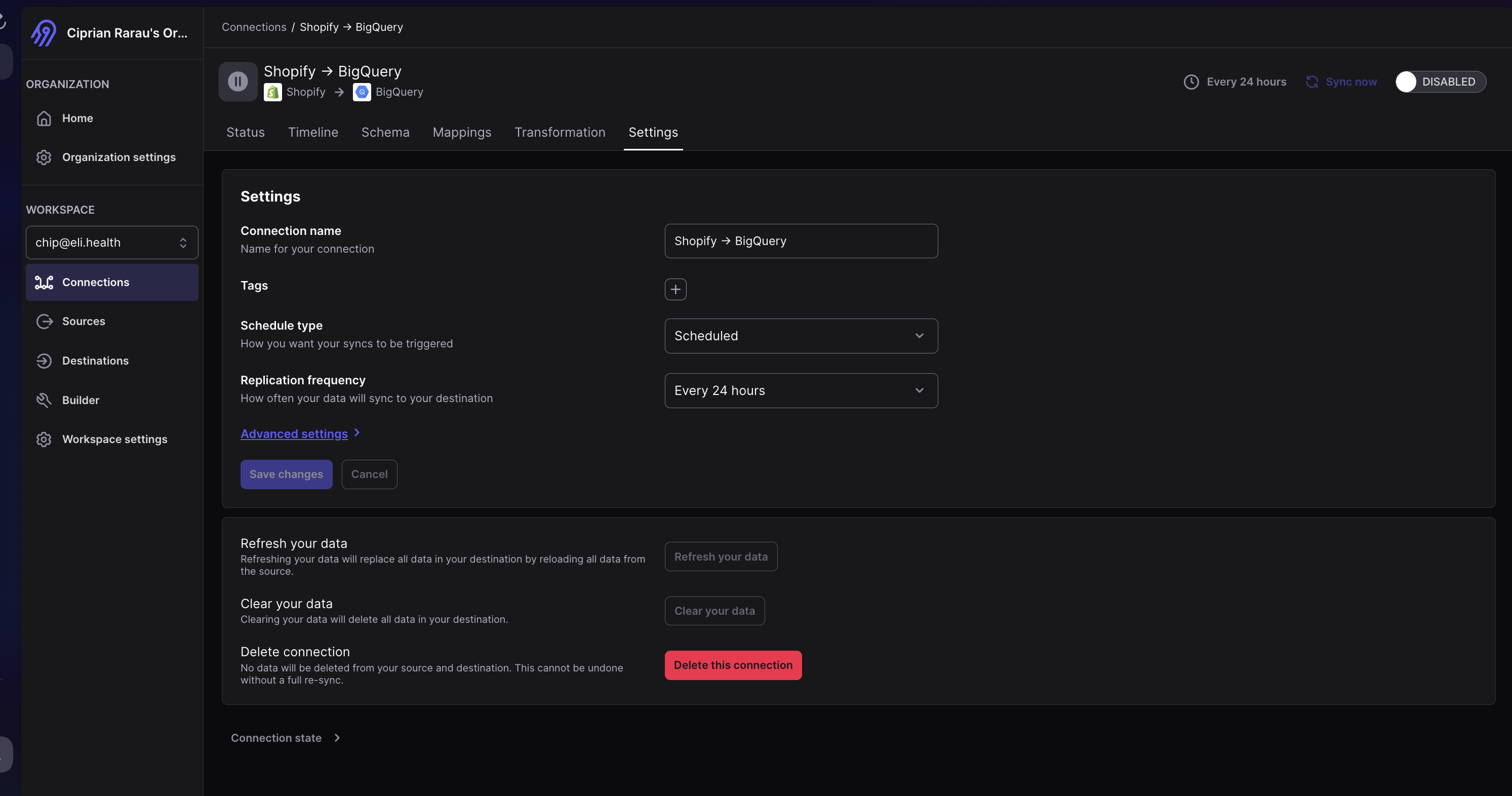
Shopify → BigQuery
Purpose: Synchronizes e-commerce data from our Shopify store to BigQuery for analytics and reporting.
Sync Schedule: Every 24 hours Status: Active
Configuration Details
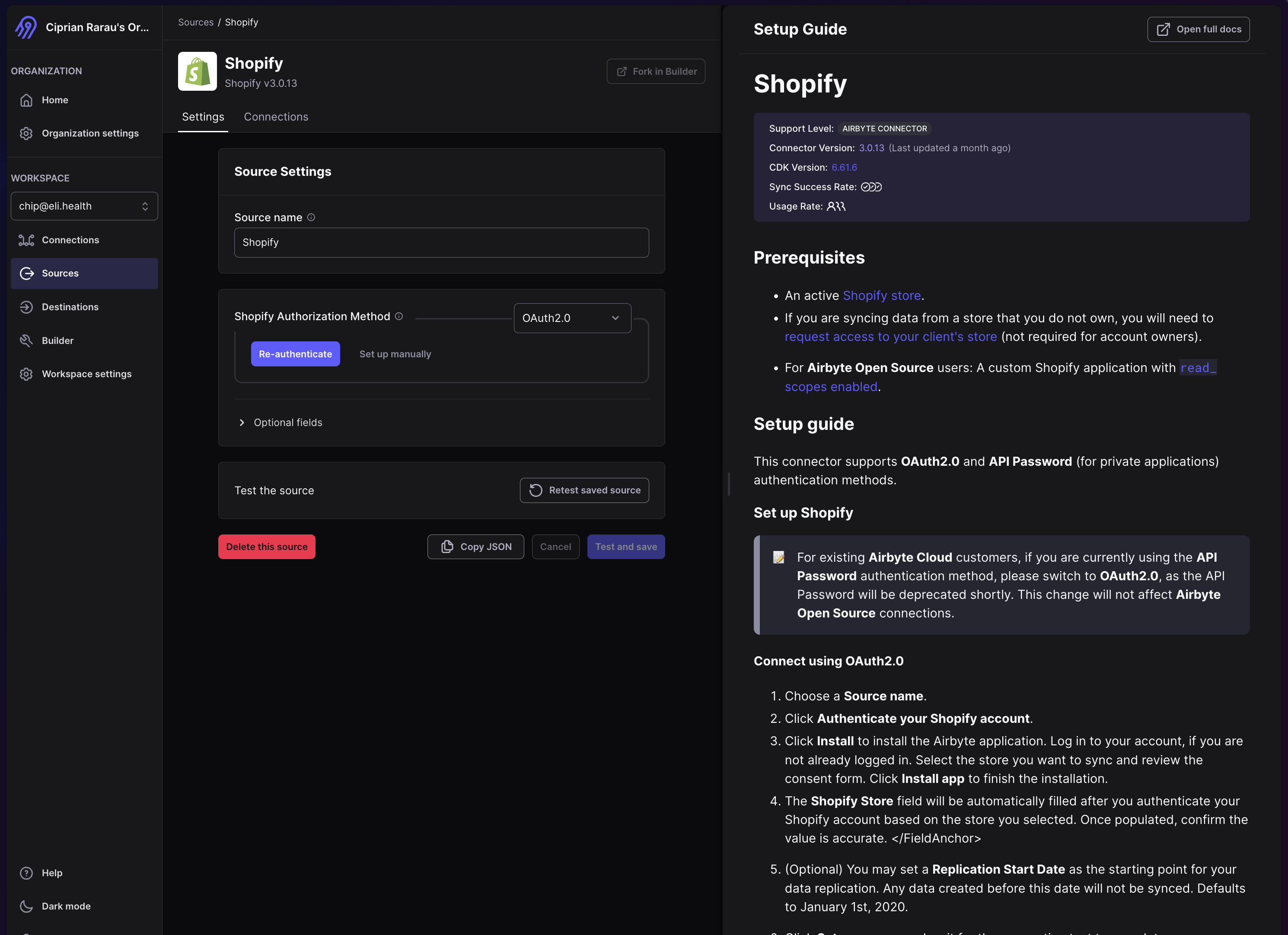
Source: Shopify
Our Shopify source connector extracts data from the Eli Health Shopify store.
Configuration:
- Source Name: Shopify
- Authentication Method: OAuth 2.0
- Connector Version: Latest stable version
- SDK Version: Built on Airbyte CDK
Data Synced:
- Orders (including line items, shipping, taxes)
- Customers (contact information, order history)
- Products (catalog, variants, pricing)
- Inventory items
- Transactions and payments
- Refunds
- Fulfillments
- Collections
- Discounts
- Abandoned checkouts
Sync Method: Incremental sync based on updated_at timestamps to minimize data transfer and improve performance.
Destination: BigQuery
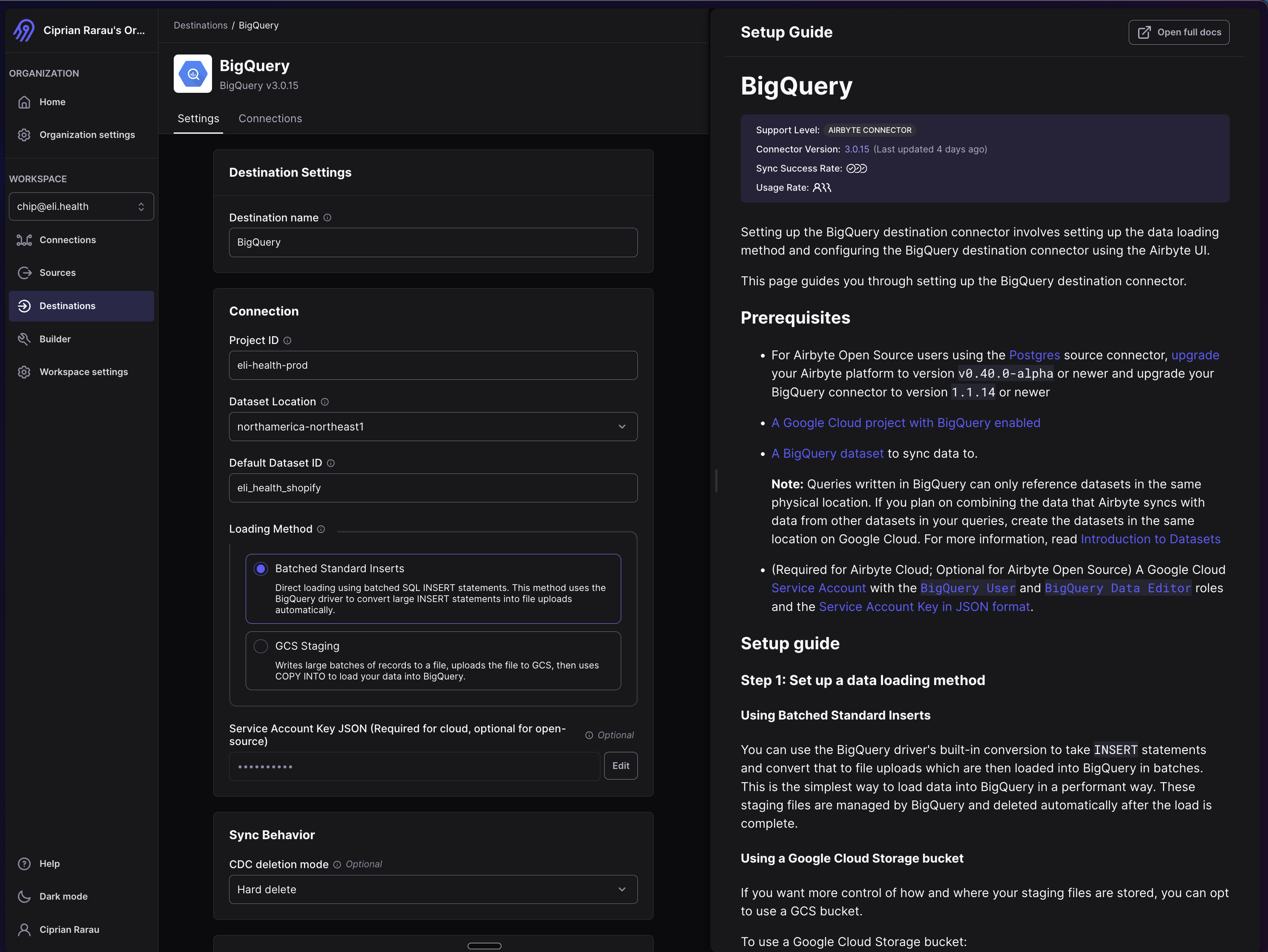
Data from Shopify is loaded into our production BigQuery data warehouse.
Configuration:
- Destination Name: bigquery
- Project ID:
eli-health-prod - Dataset Location:
northamerica-northeast1(Montreal region) - Default Dataset:
eli_health_shopify - Loading Method: Standard Inserts
- Sync Behavior: CDC (Change Data Capture) with Hard Delete mode
- GCS Staging: Enabled for large data loads
Authentication: Service Account Key (JSON)
- Service Account:
airbyte-service-account@eli-health-prod.iam.gserviceaccount.com - Required Permissions:
roles/bigquery.dataEditor- Write data to BigQueryroles/bigquery.jobUser- Run BigQuery jobsroles/storage.objectViewer- Read from GCS for staging
Connection Settings
Connection Name: Shopify → BigQuery
Sync Configuration:
- Schedule Type: Scheduled
- Replication Frequency: Every 24 hours
- Normalization: Enabled (transforms nested JSON into relational tables)
- Data Residency: Canada (northamerica-northeast1)
Service Account Management
Service Account Details
The Airbyte integration uses a dedicated service account with minimal required permissions:
# Service Account Email
airbyte-service-account@eli-health-prod.iam.gserviceaccount.com

# Project
eli-health-prod
Generating Service Account Keys
If you need to rotate or regenerate the service account key:
# Generate a new key
gcloud iam service-accounts keys create airbyte-service-account-key.json \
  --iam-account=airbyte-service-account@eli-health-prod.iam.gserviceaccount.com \
  --project=eli-health-prod

# List existing keys
gcloud iam service-accounts keys list \
  --iam-account=airbyte-service-account@eli-health-prod.iam.gserviceaccount.com \
  --project=eli-health-prod

# Delete old/compromised keys
gcloud iam service-accounts keys delete KEY_ID \
  --iam-account=airbyte-service-account@eli-health-prod.iam.gserviceaccount.com \
  --project=eli-health-prod
IMPORTANT: Never commit service account keys to version control. Store keys securely in Google Secret Manager or a secure password manager.
BigQuery Dataset Structure
Dataset: eli_health_shopify
All Shopify data is synchronized into the eli_health_shopify dataset in BigQuery.
Location: northamerica-northeast1 (Montreal, Canada)
Common Tables:
orders- Customer orders with line itemscustomers- Customer profiles and contact informationproducts- Product catalog with variantsinventory_items- Inventory levels and SKUstransactions- Payment transactionsrefunds- Order refunds and returnsfulfillments- Shipping and fulfillment datacollections- Product collections and categoriesdiscounts- Discount codes and promotionsabandoned_checkouts- Incomplete checkout sessions
Schema Management: Airbyte automatically manages table schemas and handles schema evolution when Shopify adds new fields.
Monitoring & Maintenance
Monitoring Sync Status
-
Airbyte Cloud Dashboard:
- Log in to Airbyte Cloud at cloud.airbyte.com
- Navigate to Connections → "Shopify → BigQuery"
- Check the Status tab for recent sync runs
- View the Timeline tab for sync history
-
BigQuery Monitoring:
- Check table update timestamps in BigQuery
- Verify row counts match expected volumes
- Monitor for schema changes
Common Issues & Troubleshooting
Sync Failures
Symptoms: Connection shows failed status in Airbyte dashboard
Common Causes:
- Shopify API rate limits exceeded
- Service account permissions changed
- Network connectivity issues
- BigQuery quota exceeded
Resolution:
- Check error logs in Airbyte dashboard
- Verify service account permissions
- Check BigQuery quota usage
- Retry the sync manually
Missing or Stale Data
Symptoms: Data in BigQuery is outdated
Resolution:
- Check last successful sync time in Airbyte
- Manually trigger a sync using "Sync now" button
- Verify Shopify API credentials are still valid
- Check for any filtered streams in connection settings
Schema Evolution
Symptoms: New Shopify fields not appearing in BigQuery
Resolution:
- Trigger a "Refresh schema" in Airbyte source settings
- Enable new streams/fields in connection settings
- Run a full refresh sync if needed
Alerts & Notifications
Set up monitoring for:
- Failed Syncs: Alert when sync job fails
- Sync Delays: Alert when sync hasn't run in > 25 hours
- Data Volume Anomalies: Alert on unexpected row count changes
- BigQuery Errors: Monitor for write errors to BigQuery
- API Rate Limits: Watch for Shopify API throttling
Data Usage & Analytics
Querying Shopify Data
Example queries for common analytics:
-- Daily order volume and revenue
SELECT
  DATE(created_at) as order_date,
  COUNT(*) as order_count,
  SUM(total_price) as total_revenue
FROM `eli-health-prod.eli_health_shopify.orders`
WHERE created_at >= TIMESTAMP_SUB(CURRENT_TIMESTAMP(), INTERVAL 30 DAY)
GROUP BY order_date
ORDER BY order_date DESC;

-- Top selling products
SELECT
  p.title as product_name,
  COUNT(DISTINCT o.id) as order_count,
  SUM(li.quantity) as units_sold,
  SUM(li.price * li.quantity) as total_revenue
FROM `eli-health-prod.eli_health_shopify.orders` o
JOIN `eli-health-prod.eli_health_shopify.order_line_items` li ON o.id = li.order_id
JOIN `eli-health-prod.eli_health_shopify.products` p ON li.product_id = p.id
WHERE o.created_at >= TIMESTAMP_SUB(CURRENT_TIMESTAMP(), INTERVAL 90 DAY)
GROUP BY p.title
ORDER BY total_revenue DESC
LIMIT 10;

-- Customer lifetime value
SELECT
  customer_id,
  customer_email,
  COUNT(*) as order_count,
  SUM(total_price) as lifetime_value,
  MIN(created_at) as first_order_date,
  MAX(created_at) as last_order_date
FROM `eli-health-prod.eli_health_shopify.orders`
WHERE customer_id IS NOT NULL
GROUP BY customer_id, customer_email
ORDER BY lifetime_value DESC
LIMIT 100;
Joining with Application Data
Combine Shopify data with Eli Health application data:
-- Link Shopify orders to app users (example)
SELECT
  u.user_id,
  u.email,
  o.id as shopify_order_id,
  o.order_number,
  o.total_price,
  o.created_at as order_date
FROM `eli-health-prod.eli_backend.users` u
LEFT JOIN `eli-health-prod.eli_health_shopify.orders` o
  ON LOWER(u.email) = LOWER(o.customer_email)
WHERE o.created_at IS NOT NULL
ORDER BY o.created_at DESC;
Security Considerations
Data Security
- Encryption at Rest: All BigQuery data is encrypted by default
- Encryption in Transit: Airbyte uses HTTPS/TLS for all data transfers
- PII Protection: Customer data should be masked in non-production environments
- Access Control: BigQuery IAM roles limit who can access Shopify data
Network Security
- Airbyte Cloud uses IP whitelisting for additional security
- Service account keys are stored in Google Secret Manager
- All API communications use OAuth 2.0 or API key authentication
Compliance
- Data Residency: All data stays within Canada (northamerica-northeast1)
- HIPAA Compliance: Shopify data does not contain health information
- Privacy: Customer PII is protected per privacy policy
- Audit Logs: All data access is logged in BigQuery audit logs
Cost Optimization
Current Costs
- Airbyte Cloud: Based on Monthly Active Rows (MARs)
- BigQuery Storage: ~$0.02 per GB per month (northamerica-northeast1)
- BigQuery Queries: $6.25 per TB scanned (northamerica-northeast1)
- Network Egress: Minimal (data stays in same region)
Optimization Strategies
- Incremental Syncs: Only sync changed records to reduce data transfer
- Sync Schedule: Daily sync balances freshness with cost
- Table Partitioning: Partition large tables by date for query optimization
- Clustering: Cluster tables on common query fields
- Data Retention: Archive old data to cheaper storage tiers
- Query Optimization: Use partitioned queries to reduce costs
Backup & Disaster Recovery
Data Backup
- Airbyte State: Airbyte Cloud manages connector state backups
- BigQuery Snapshots: Create periodic snapshots of critical tables
- Export to GCS: Export data to Cloud Storage for long-term archival
Recovery Procedures
Full Refresh:
# In Airbyte dashboard:
# 1. Go to Connection Settings
# 2. Click "Refresh your data" button
# 3. Confirm full refresh - this will reload all data from Shopify
Point-in-Time Recovery:
-- Restore a table from a previous day using BigQuery time travel
SELECT * FROM `eli-health-prod.eli_health_shopify.orders`
FOR SYSTEM_TIME AS OF TIMESTAMP_SUB(CURRENT_TIMESTAMP(), INTERVAL 2 DAY);
Important Notes
Data Replication Scope
What Airbyte Handles:
- Shopify → BigQuery synchronization
- E-commerce data integration
What Airbyte Does NOT Handle:
- PostgreSQL → BigQuery: This is handled by Google Cloud Datastream, not Airbyte
- Application database replication
- Real-time streaming (Airbyte runs on scheduled batch syncs)
Related Documentation
- DevOps Overview - Infrastructure and deployment
- BigQuery Access - Data warehouse permissions
- Data Pipeline - Overall data architecture
- Airbyte Documentation - Official Airbyte docs
- BigQuery Best Practices - Google Cloud docs
Support & Contact
For issues with Airbyte integration:
- Check Airbyte Dashboard: cloud.airbyte.com
- Review Error Logs: Available in connection timeline
- Airbyte Support: Available through Airbyte Cloud support portal
- Internal Contact: DevOps team at Eli Health
Last Updated: November 2025 Maintained By: Chip (chip@eli.health) Airbyte Version: Cloud (managed service)